X-Rite i1 Pro 3 not working with HP Easy Profiling
Problem/Question
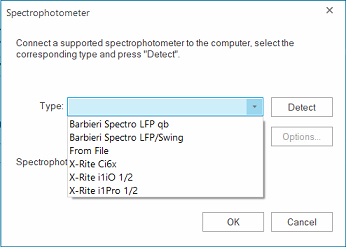
Trying to measure an HP Easy Profiling chart with an X-Rite i1 Pro 3 you may face the situation that the device selection window does not disappear when pressing the "Ok" button.
Unfortunately, it is not an officially supported measurement device for the HP Easy Profiling tool.
This is why it is not shown when the HP Easy Profiling is used. (It is actively filtered out.)
This is why it is not shown when the HP Easy Profiling is used. (It is actively filtered out.)
Solution/Work-Around
A) Use one of the supported devices.
B) Do the Color Management with the Ergosoft Density Linearization and ColorGPS.