How to configure the barcode position for flatbed cutters?
Problem/Question
When printing barcodes for flatbed cut drivers the default position of the barcodes do not suit your needs, e.g. because you print the job centered for transfer sublimation and your paper is wider than the fabric so that the default barcode may not be transferred to the media.
You found the barcode configuration in the "Barcode" section of your cut environment and wonder how to use the square and round marks for the barcode position.
Solution/Work-Around
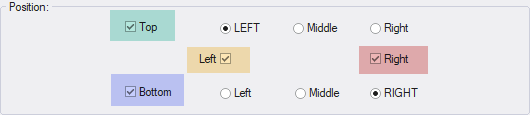
The barcode configuration allows setting the sides on which the barcode is printed as well as the position within the job width for the top and bottom barcodes.
Configuration of the side at which the barcode is printed:
The square boxes stand for the side of the printout. They can be combined.
Configuration of the barcode position within the top or bottom of the printout:
The round selections stand for the position within the top or bottom. Only one selection for "Top" and one selection for "Bottom" is possible.

(This printout is cheated for the explanation. It is not possible in reality.)
Related Articles
Barcode Content Verification Website
Problem/Question A user has provided and claims a barcode does not work with our add-ons. How can the content of the barcode be varified? Solution/Work-Around Depending on the type of barcode, the content may have various requirements and/or ...
Mimaki CJV150 Cut Only
Problem/Question Cut Only job is moved to the Done section after dispatch but the device is not moving - not cut has been done. Caused by the variety of different USB driver provided by Mimaki, somtimes cut only on the CJV150 does not work properly. ...
How to use Summa F-Series Cutters?
Problem/Question How to use Summa F-Series Cutters? Solution/Work-Around To use the Summa F-Series Cutters, you should follow the normal Ergosoft procedure for cutting. It just need special attention regarding the Driver mode you want to use. Please, ...
Cut button grayed out / not available
Problem/Question ContourCut is licensed, but the “Cut” button in the software is grayed out and cannot be used. Solution/Work-Around “Contour Cut” has to be activated Within JobComposer select "View" (top menu) Open "Tools" Check "Cut Environments" ...
Spot color is printed even though the Job Cut Settings are set to prevent this
Problem/Question In some workflows, the option “Do not print this spot color” in Job Cut Settings does not work as expected. Even though the option is enabled, the spot color is still printed instead of being suppressed during printing. ...